


Another Recent Posts Widget for Blogger. Unlike the first Recent Posts widget, this new widget for Blogger lets you display more than 5 recent posts on your blog. It will show not only post titles but also post excerpts or snippets.
Click here if you want a Recent Posts widget with thumbnails.
What you can do with this widget:
- you change the number of posts
- you can change the number of characters of the post snippet/excerpt, or
- you can display post titles only
- show the post dates
See Installation and Optional Settings below.
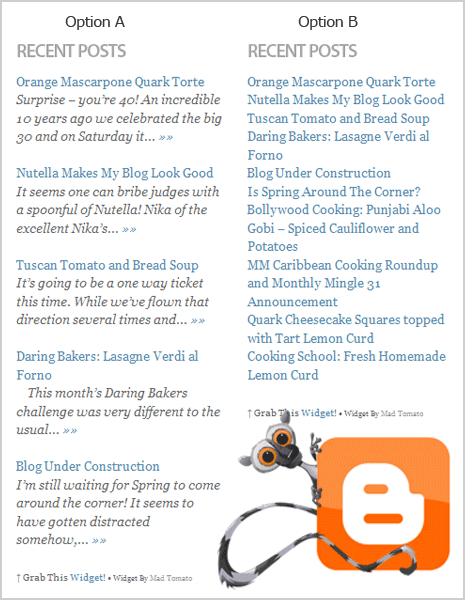
Screenshot:
Get Code
Option A: Recent Posts Widget with post snippets
<div id="mtrpwa">
<script style="text/javascript" src="https://sites.google.com/site/projectdigitaltomato/blogger/js/rpost-english.js"></script>
<script style="text/javascript">var numposts = 5;var showpostdate = false;var showpostsummary = true;var numchars = 100;var standardstyling = true;</script>
<script src="http://YourOwnB1og.blogspot.com/feeds/posts/default?orderby=published&alt=json-in-script&callback=showrecentposts"></script></div>
<div style="font-family: arial, sans-serif; font-size: 9px;" id="rpdr"><a href="https://madtomatoes.com/recent-posts-widget-2/" title="Grab this Recent Posts Widget" target="_blank">Recent Posts Widget</a> by <a href="https://madtomatoes.com" title="Recent Posts Widget">Blogger Widgets</a></div><noscript>Your browser does not support JavaScript!</noscript>
<style type=text/css>
#rpdr {background: url(http://3.bp.blogspot.com/-wsIqUGbMUyk/TchLsqCK3QI/AAAAAAAACmU/udeV22bGZ78/s400/blgo.png) 0px 0px no-repeat; padding: 1px 0px 0px 19px; height:14px; margin: 5px 0px 0px 0px;line-height:14px;}
#rpdr, #rpdr a {color:#808080;}
#mtrpwa { border-bottom:1px #cccccc dotted; margin-top:-10px; padding-bottom:10px;}
.mtrpw a {font-weight:bold; }
.mtrpwsumm {}
</style>
Option B: Recent Posts Widget showing post titles only
<div id="mtrpwb">
<script style="text/javascript" src="https://sites.google.com/site/projectdigitaltomato/blogger/js/rpost-english2.js"></script>
<script style="text/javascript">var numposts = 10;var showpostdate = false;var showpostsummary = false;var numchars = 100;var standardstyling = true;</script>
<script src="http://YourOwnB1og.blogspot.com/feeds/posts/default?orderby=published&alt=json-in-script&callback=showrecentposts"></script></div>
<div style="font-family: arial, sans-serif; font-size: 9px;" id="rpdr"><a href="https://madtomatoes.com/recent-posts-widget-2/" title="Grab this Recent Posts Widget" target="_blank">Recent Posts Widget</a> by <a href="https://madtomatoes.com" title="Recent Posts Widget">Blogger Widgets</a></div><noscript>Oops! Make sure JavaScript is enabled in your browser.</noscript>
<style type=text/css>
#rpdr {background: url(http://3.bp.blogspot.com/-wsIqUGbMUyk/TchLsqCK3QI/AAAAAAAACmU/udeV22bGZ78/s400/blgo.png) 0px 0px no-repeat; padding: 1px 0px 0px 19px; height:14px; margin: 5px 0px 0px 0px;line-height:14px;}
#rpdr, #rpdr a {color:#808080;}
#mtrpwb { }
.bbrecpost2 {
padding-top:6px;
padding-bottom:6px;
border-bottom: 1px #cccccc dotted; }
</style>
How To Install
1. Go to your Blogger Dashboard > your blog’s Layout > Add a Gadget > HTML/JavaScript
2. Copy and paste the code into the new HTML/JavaScript.
3. In the code, look for the line…
…src=”http://YourOwnB1og.blogspot.com/feeds/posts/default...
…and replace the blog address (shown in color red below) with your own blog address
…src=”http://YourOwnB1og.blogspot.com/feeds/posts/default...
(For custom domains)…
…src="http://www.YourOwnB1og.com/feeds/posts/default...
4. Add a title. Save. That’s it!
Optional Settings
How to change the Number of Posts
To change the number of posts, just look for the number 5 (for Option A) in the code and replace it with the number of posts you want to be displayed. (For Option B, look for the number 10).
Recommend setting for Option A: 5 to 8.
Recommend setting for Option B: 5 to 15.
... var numposts = 5;var...
How to change the Number of Characters (for Option A only)
This widget is set to display an excerpt (snippet) of 100 characters of each post. If you want to change that number, just look for the number 100 in the code and replace it with the number of characters you want to be displayed.
Recommended setting: 50 to 100.
... numchars = 100;var...
How to Show Post Date
If you want to show the post date, look for the line with the word showpostdate in the code. Then change its value from false to true (shown in color red below).
... showpostdate = false;var...
That’s it! Have fun!
Please let me know what you think of this widget by leaving a comment below.
(PHOTO: VancityAllie/flickr)
I have it installed and changed the feed address but it doesn’t seem to work. Any ideas??
@Angelique Lee
Oops! There was an error in the code and I forgot to update it. :-P You may copy the code now.
thanks a lot!
but is it possible to show all posts?
Hmmm? I’m not sure. :D But you can try this: set the number of posts to 100000.
hi!
your widget worked great! thank you so much for this…
hi, this worked for my blog. Thanks. It didn’t work initially as the code had some extra stuff at the end relating to madtomato everytime I copied it. I deleted it and it was fine after that. I also didn’t know that I had to turn on the site feed, so my fault.
great widget
thx
wow… cool widget. been trying to find away to edit number of posts that can be shown. You solve it all. Thks a lot
I just recently added the “recent posts” widget and the “recent comments” widget. Both are up, but the “recent posts” widget leaves a big gap after the title and the first post while the “recent comments” does not. Is there anyway to fix this?
HI.. can u check my blog..? it doesn’t appear!
Try installing the code again.
Hi MadTom..I like it..! Thank you so much!!
can you add ‘marquee’ to it so it will look like it is sliding and could the code include the photos of the post ?
Thanks for this widget. Works well except for the styling. I hope I can do away with the extra space in between the post titles. Also I’d like it better if it follows the format of my unordered list.
thanks again!
your widget works great!! thx ;D
Thanks, Tom! Works perfectly! I was looking for something just like this, and the widgets Blogger listed just weren’t cutting it–thanks again for the tip!
hi, thank you very much, works great!!
Hey there, great script. Do you know how I can add a picture to each of the feeds?
Every entry that I do starts with a picture, I just want them to appear there.
Hi.
Is the any way for me to make it 100 post?
I wanna make something like site map on a page of my blog.
Just follow the instruction: Other Options (How to change the Number of Posts).
Just replace the number of posts to be displayed with the desired number.
Hi! Thanks, it works great! However is there way to order the posts by alphabetical?
No. But I’ll try to look into that..
thanks for the update man.. ur awsome!! haha
Totally! :D
Hi,
The example above uses a feed from blogspot. Is it also possible to post a feed from delicious on a blogspot blog using your component? When I change the URL from a blogspot URL into the delicious URL, nothing happens (as in, shows no results).
Kind regards
Hi Geesje Philippi,
This widget works only with Blogger/blogspot feed URLs.
One way to display feed from a delicious rss feed is by using the Blogger Feed gadget.
I need some help here, the post title likes to go a random color that doesn’t go with my theme, however the date and summary do match my theme. I’ve tried using a tag but it changes everything BUT the post title, which is what i need to change.
Any ideas?
Hi,
How to change font color?
Thanks
I love this widget, but wish there was a way to include thumbnails of any pics in the individual posts(under the corresponding post title, naturally).
Would that be a terribly complicated addition?
Thanks for this lovely widget.Will be fiddling with it today. :-)
Try this Recent Post Widget with Thumbnails.
Great…
thanks 4 sharing..
Hello MadTomatoe …
I have installed “Option A” and
it’s working great.
I followed your instruction to change the number posts.
I tried to change the number of posts to 40, But it shows only MAXIMUM 25 posts.
Is 25 posts the max limit ?
This widget uses the Feed element of Blogger. 25 may be the maximum number of posts allowed by Blogger.
Thanks MadTom !
Does anyone has the fullcode?
Hi Jane, I’m sorry about the missing file/code. I’ve already fixed the code.
I’ve moved the location of the script, so you have to copy code and install it on your blog again.
thank you very much!!!
:)
Hi
I would like to find the code for the comment-reply you have on your blog.
Thanks
hi! I’m using WordPress platform on this blog.
Thanks for the tips… pretty helpful… Try it on my blog…
I am curious how to style the individual elements in the widget. For instance, in the Option A example image, you have the title in one color and font size, and the post snippet in italics, smaller, and a different color. but you don’t address how to style it like this. Can you give a gal a hand here? Thanks for sharing your work!
Hi Shay, the style (font style, size and color) of this widget inherits the style of your blog. But you can customize it by adding this CSS to the widget’s code (paste it at the bottom of the widget):
<style type=text/css>
.mtrpw a {font-size:13px; font-weight:bold; color: red;}
.mtrpwsumm {font-style: italic;}
</style>
You can edit line no.2 and 3 to suit your needs.
Line #2 is for the post titles. Line #3 is for the post snippets.
Just one question…
What is this ↑ doing in there? I can’t save this to Dreamweaver even though I’m using utf-8
You can just delete it.
Thanks!
This is great, simple and easy to set up and does what you want it.
Hi, first of all, thanks for the widget, it’s great!
Two questions:
Is there a way to remove the bullet points?
Can I make the size of the post title bigger than that of the post summary?
Thanks!
Sara
Hi MadTom
This Wedge worked perfectly. Thank you! I want to now lower the title a little bit in order to have a little smaller space between the title and the first recent post. Can I do it? Thanks so much!
Paste this tag before the widget’s code (above the code):
Thank you so much! :)
Hi MadTom, finally my “new” website is live now and you can see the widget on the bottom (the bottom left side is currently empty, ’cause i want to place another widget).
I have a question: is there a way to delete the most current post from the list of current post? Meaning, it should show the latest posts, but excluding the newest one, which is already in the homepage.
Confusing enough? let me know if you can help…
Thanks, you rock!!
By the way, I also installed the recent comments widget taken from you, works great! Thanks.
Sara
How do I augment it to show the picture or a thumbnail of the picture of the posts in the feed?
Click here if you want a
Recent Posts widget with thumbnails.
This is very helpful to me.
Nice post!!!!
Thanks a lot to u and this blog.
I was curious if it was possible to show the comment’s author?
I tried var showauthor = true; but it didin’t work.
Hello, I have a question: the weather widget works correctly in most browsers, but in internet explorer 6 and 7 not too. For example my posts titles are short … and I display 2 titles on the same row and not aesthetic.
I found a way to enlarge the size of the characters, but I’m thinking that another way. Should I use in the .js file but do not know exactly where.
Can you help me?
Thanks in advance, I apologize for my English, but I am from Romania.
hi Brother, i still can’t adding this code to my blog,
Thank’s, but can i change the date (ex:”09 july”) into time (ex:”05:30″) ?
Thanks for the recent posts widget. Nice and simple and it works well.
can you give me a recent posts widget with slider to down?
Is it possible that this widged suddenly stopped working?
Just a few days ago, I added the recent post widget directly from blogger. It does not work properly. On some pages, it comes as blank. I will try this one out. Thanks:)
How do i change text color to black?
The Best Blog, I like It………….
When I attempted to insert the Recent Posts A or the other Post html (because my post box is not showing), my editor kicked it out as not being properly formatted.
Any thoughts?
Thanks,
-Jane
When I attempted to insert the Recent Posts A or the other Recent Posts widget code (because my post box is not showing), my editor kicked it out as not being properly formatted.
Any thoughts?
Thanks,
-Jane
You don’t have to edit your template’s html. Just follow the instruction in the post on how to install:
Just go to your dashboard > your blog’s layout > then add a Gadget (HTML/JavaScript). Then paste the code in the HTML/JavaScript gadget. Don’t forget to add your blog address (step #3).
Very simple and useful. Thanks!
Thanks, this was just what I needed