

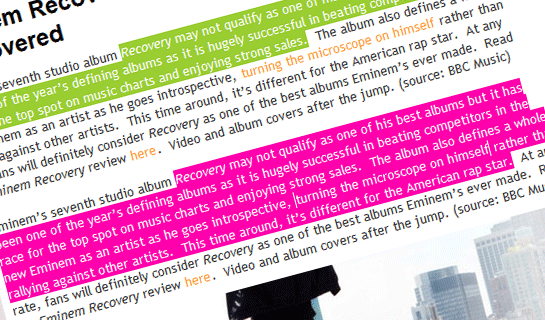
Now you can change your blog’s default text highlight color with cute colors of your choice by adding this cool CSS3 declaration — ::selection — to your stylesheet. Here’s how to use it:
::selection {
	background: #ffb7b7; /* Safari */
	}
::-moz-selection {
	background: #ffb7b7; /* Firefox */
}
If you want to change the color of the selected text, just add color: like this…
::selection {
	background: #ffb7b7; /* Safari */
        color: #ffffff;
	}
::-moz-selection {
	background: #ffb7b7; /* Firefox */
        color: #ffffff;
	}
It’s something that most visitors would never see, but it’s a fantastic visual touch for those who would. This trick works on all major browsers except IE. As always, IE is left behind.
How To Change Text Selection or Highlight Color in Blogger
-
Edit your blog’s template and paste the code in the template’s CSS:
- Go to your Blogger dashboard > Design > Edit HTML
- In the template HTML, find the CSS for the body element.
It looks something like this: (it starts withbody {)body { background:$bgcolor; margin:0; color:$textcolor; font:x-small Georgia Serif; text-align: center; } - Paste the code just before the
body {,
so that it would look something like this:::selection { background: #ffb7b7; /* Safari */ color: #ffffff; } ::-moz-selection { background: #ffb7b7; /* Firefox */ color: #ffffff; } body { background:$bgcolor; margin:0; color:$textcolor; font:x-small Georgia Serif; text-align: center; }
That’s it.
If you need help in adding the code to your Blogger or WordPress blog, just leave a comment below.
(src: thanks to css-tricks)
Heyy , can I know where I gonna put that code for blogger ?
The post has just been updated. The steps on how to add the code to Blogger is now included. Check it out.
I managed to change my default text selection color. However, once texts skip a line, (for a new paragraph for example) it goes back to it’s original (blue) color. How do I solve this? It contradicts with the color of my text selection color so it becomes ugly.
we have the same problem
hey! i found the solution for that!!
all you have to do is:
include ALL your text between and
those “p” tags indicates the beggining and the end
of each paragraphs.
so let’s say,
in your HTML document your paragraphs look like this:
big brown fox stepped outside it’s den
blah blah blah this is a paragraph
that i put inside my HTML document
hello i am a paragraph
hello i am a paragraph
hello i am a paragraph
hello i am a paragraph
hello i am a paragraph
hello i am a paragraph
As you can see, each paragraphs are not in between and .
if you don’t include them inside those “html tags” then the problem occurs. you will see the default text selection combined with you preffered text selection background..
hope this helps! again, just include your sentences between and . got it?
include them between <p> </p>
those got digested as html tags when i posted them.
sorry if it became confusing
Where can i get this code for tumblr?
Thanks that was easy! no jQuery needed!
Thank you so much ! Just what I was looking for :)
I try to put the code on the widget and it’s not work, and I found your tutorial, try in my blog and, voila! it works! thank you very much, this is just what I looking for :)